Checking the address a headless browser actually connects to
Pagewright is a small self-hosted render API. Keeping its headless browser off my network meant vetting the IP of every connection it makes.
I wanted a service I could send a URL to and get the page back as Markdown after its JavaScript had run. Hosted render APIs like ScrapingBee do this. I wanted one I could run myself, so I wrote pagewright. It’s Fastify in front of Playwright’s Chromium, with Turndown doing the HTML-to-Markdown step.
The API is one endpoint:
curl -s -X POST localhost:8080/render -H 'X-API-Key: your-key' \
  -H 'content-type: application/json' \
  -d '{"url":"https://example.com","format":"markdown"}'
format is json, markdown or html. wait is "load", "networkidle" or a number of milliseconds. selector waits for an element and returns only that element. A missing or wrong key gets 401. By default two renders run at once and ten more can wait, and the next request gets 429 with Retry-After: 5. timeout_ms defaults to 30 seconds and is capped at 60, and a render that runs past it gets 504.
robots.txt
Pagewright fetches robots.txt for the origin of the URL you ask for and follows it for its own user agent, pagewright/0.1, which it also sends with page requests so a site can see who’s fetching. A disallowed URL gets a 403 that names the rule. Only that submitted URL is checked. Redirect targets and the page’s subresources aren’t checked against robots.txt. This is from the proof run in the repo, against a local fixture server:
{"error":"robots_disallowed","detail":"disallowed by robots.txt for user-agent \"pagewright/0.1\" (rule: Disallow: /private)"}
HTTP 403
If robots.txt returns a 5xx or can’t be reached, pagewright refuses the page. A 4xx counts as having no robots.txt, which is what RFC 9309 says to do. There’s no stealth mode, fingerprint spoofing, proxy rotation or captcha solving, and the README says pull requests adding them will be declined.
The browser picks its own destinations
A render API takes a URL from a caller and fetches it from inside your network. Without a guard, a request for http://169.254.169.254/ reads cloud instance metadata, and http://localhost:6379/ talks to whatever is listening there. Pagewright refuses targets in the IANA special-purpose ranges (IPv4, IPv6), plus multicast. That covers loopback, RFC 1918, link-local, CGNAT and their IPv6 counterparts. It also covers IPv4 addresses written inside IPv6, such as ::ffff:7f00:1, which is 127.0.0.1.
The caller’s URL is only the first request. Once the page loads it can redirect, load images, call fetch and open WebSockets, and the page’s author picks every one of those destinations.
My first version checked each request in a Playwright ctx.route handler before letting it through. A security review of that version on 2026-10-12 came back with a list of findings, tagged H1 to H6, M3 and M7 to M10 in the header of test/security.test.ts. Two of them, H1 and M3, were about the egress check itself. The route handler never saw redirect hops or WebSockets. And the check resolved the hostname, approved the answer, and then Chromium resolved the same name again on its own when it connected. The rest covered the address classifier, the robots.txt fetch, a job deadline, parsing blowups, resource caps, browser launch hygiene and the Docker image.
That second gap is DNS rebinding. A DNS server under an attacker’s control answers with a public address when the check asks and 127.0.0.1 when the browser asks a moment later. The check passes and the browser connects somewhere else.
One lookup, used for both the check and the connection
The fix was to stop Chromium from resolving names at all. A browser configured with an HTTP proxy sends the hostname to the proxy, in the request line for plain HTTP or in a CONNECT host:port line for HTTPS and WebSockets, and the proxy does the lookup. So pagewright starts a small forward proxy inside its own process, listening only on 127.0.0.1, and every browser context it creates goes through it.
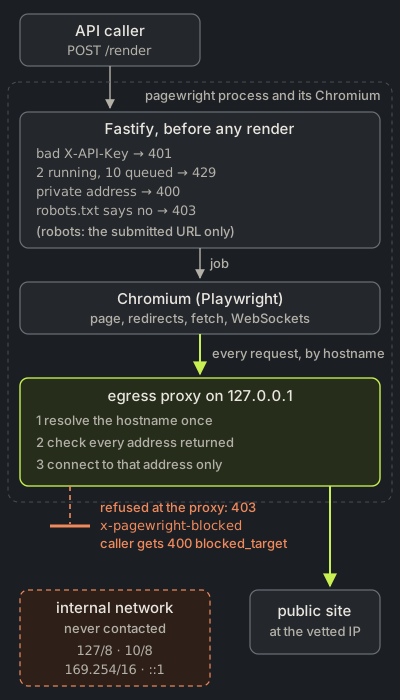
For each plain request or CONNECT tunnel, the proxy:
- Resolves the hostname once, giving up after five seconds.
- Checks every address in the answer, and refuses the request if any of them is private.
- Connects through a
lookupfunction that only ever returns those vetted addresses, so Node can’t resolve the name a second time.
A refused plain request gets a 403 with an x-pagewright-blocked header, and a refused tunnel gets a 403 on the CONNECT. The renderer turns either one into 400 blocked_target when it happens on the main navigation.
Three smaller details closed the remaining routes around the proxy. Chromium skips the proxy for loopback addresses by default, so the bypass list is <-loopback>, which removes that exemption. WebRTC can send UDP outside a proxy, so the browser launches with --force-webrtc-ip-handling-policy=disable_non_proxied_udp. The robots.txt fetch doesn’t go through the browser, so it follows redirects itself, at most five, and runs the same resolve, check and pin steps on every hop.
The rebinding test uses a fake resolver and two servers on the same port, one on 127.0.0.1, which the test treats as public, and one on ::1, which plays the internal network. The resolver answers 127.0.0.1 the first time it’s asked and ::1 every time after that. The page comes back from the public server. The page’s own image request then resolves to ::1, and the internal server records no hits. Other tests send a redirect to an internal IP and to an internal hostname, and an image, a fetch and a WebSocket aimed at the internal server. The full suite is 41 tests, including the ones that drive a real Chromium, and they pass in about 12 seconds on my machine.
Anything Chromium sends outside its proxy settings isn’t covered. The loopback exemption and WebRTC were the two paths I found, and there may be others. ALLOW_PRIVATE_TARGETS=1 turns all of this off, for tests or a trusted setup. The SPEC calls an egress firewall good defence in depth.
Using it
It needs Node and a Chromium from npx playwright install chromium. Put one or more keys in PAGEWRIGHT_API_KEYS, then npm run build and npm start. It listens on 127.0.0.1:8080 unless you change HOST and PORT. The whole service is 869 lines of TypeScript. There’s a Dockerfile on the official Playwright base image, and the README notes it isn’t verified on every release. Pagewright isn’t on npm. The pagewright package there is someone else’s unrelated project.
The code is at github.com/colefoster/pagewright, MIT licensed. If you find a way for a page to reach an internal address past the proxy, I’d like to hear about it.